Introduction
The Page Replacement Policy Visualizer (PageRVis) is a webapp that simulates and presents the state of page replacement policies.
The webapp was developed by a CSC369 TA for CSC369 students. See the lab here.
To begin, take a look at the controls and supported algorithms.
Controls
This page covers the basic usage of the app and keyboard shortcuts.
Basic usage
Access Page (Grid)
Click a square in the “Access page” panel to simulate a memory access to the corresponding page.
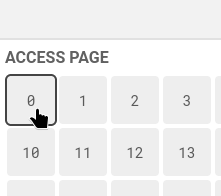
The page will change color based on it’s new state according to the selected algorithm.
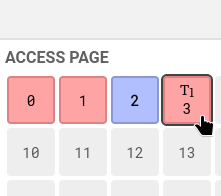
The screenshot above shows ARC after clicking 0, 1, 2, 2, 3. Hovering over 3 reveals the text “T1”, which is the page’s state in ARC.
You can also drag your cursor across pages to do a scan.
Algorithms Panel
The algorithms panel shows the state of your algorithm. Each box in this section panel show all pages the selected algorithm is keeping track of.
You can also click pages in the algorithms panel. Continuing from the example above, if we click page 3, we see it changes state to “T2”
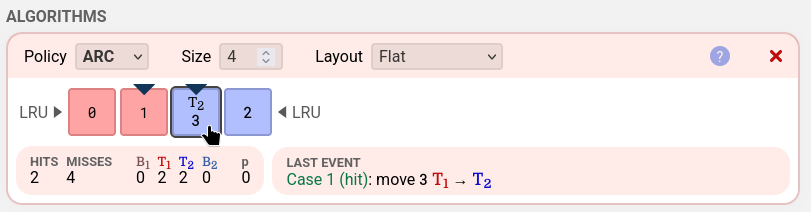
The top of each box offers 5 operations.

From left to right, they are:
- Policy: Choose between the four algorithms to visualize.
- Size: Enter the maximum number of pages the algorithm is allowed to keep loaded using the size input.
- Layout: The layout does not change anything about the algorithm, just how the algorithm’s state is visualized. You can find more information about the algorithms and the available layouts for each algorithm by accessing the documentation for the corresponding algorithm.
- “?” button: The “?” button opens the documentation in a different tab for the corresponding algorithm.
- “x” button: Remove the algorithm. Note that you keep your access history, so remaking the algorithm restores it’s state. You can also press Ctrl-Z or Cmd-Z (MacOS) to undo a removal.
Finally, the bottom of each box displays the stats (including hits, misses, and algorithm-specific details) and text explaining what the last event was.

The text is in the format “[case]: [result]”. The case portion is in green.
A list of every case PageRVis recognizes is documented in the algorithm-specific documentation accessible by the “?” button.
You can add multiple algorithms to visualize at once by pressing the “Add Algorithm” button.
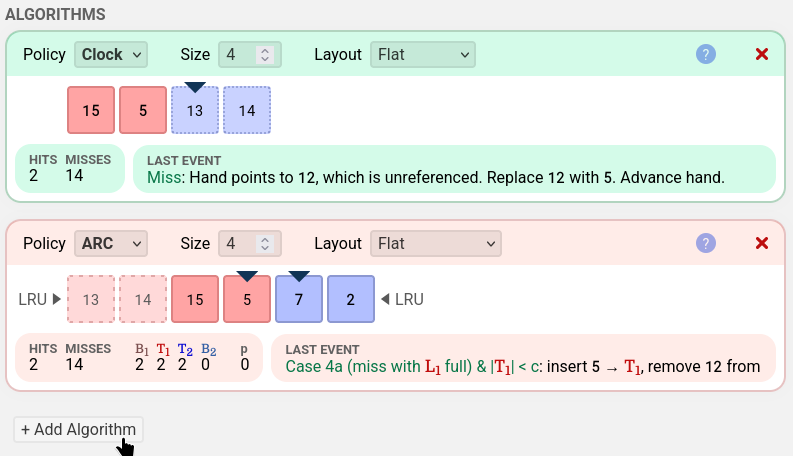
Every page access is sent to all algorithms at the same time, which is useful for comparing algorithms.
Sequence Panel
The sequence panel shows the history of all pages you’ve simulated access to.
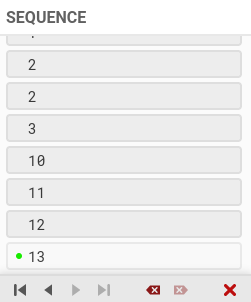
There are 7 buttons on the bottom.
From left to right, they are:
- Jump to start: view the initial empty state of all algorithms
- Step back: view the state one step before
- Step forward: view the state one step after
- Jump to end: view the state of all algorithms after every access in the list
- Delete current: removes the current access. It’s similar to step back, but the access is removed from the list, altering history.
- Delete after current: removes the access after the current access. This button alters the future.
- Clear sequence: clears the list, starting fresh.
The green circle shows the last access that each cache processed.
Note that when you access a new page when you are in the middle of the access list, you will be inserting page access in the middle of the list as well!
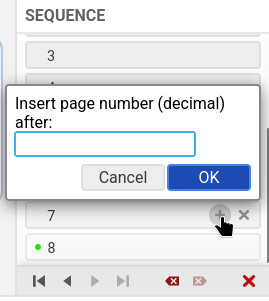
Hovering over an access entry gives options to insert a new entry after that entry (if shift is held, inserts before the entry.)
Resizing Panels
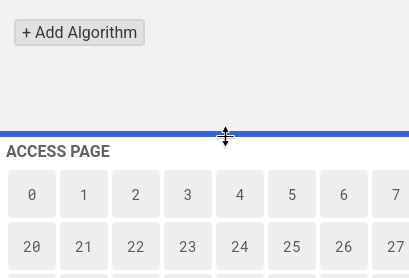
If the PageRVis window has width > 620px and height > 600px, you can resize both the Access Page and Sequence panels to fit your preferences. Making the panels small enough will hide the panels.
Keyboard Shortcuts
Keyboard shortcuts are optional, but may improve your experience.
| Action | Shortcut |
|---|---|
| Insert custom page | Enter or Any number1 |
| Step back | Left arrow |
| Step forward | Right arrow |
| Step to start | Home or Ctrl-left |
| Step to end | End or Ctrl-right |
| Remove current access | Backspace |
| Remove next access | Delete |
| Clear sequence | Ctrl/Cmd-Delete2 |
| Undo | Ctrl/Cmd-Z |
| Redo | Ctrl/Cmd-Shift-Z |
Any number will begin input for a custom page. When the “Hex page labels” option is enabled, any letter a-f will also activate the shortcut. ↩
Bypasses confirmation dialogue. You can still undo this operation. Backspace can be used to substitute for Delete. ↩
Access Page
There are two layouts for the Access Page panel.
Grid
The grid layout shows at least 1024 pages in a grid. You can scroll down to see more pages.
Compact
The compact layout uses minimal vertical space.
A horizontal list of pages is on the left side. You can move between which pages to view using the left and right arrows.
A single page is on the right. The page is always a page that no algorithm is keeping track of (either because the page has never been accessed or it’s been evicted by all algorithms).
Algorithms
PageRVis has four algorithms available for visualization.
Visit the each page to learn more about the algorithms in PageRVis.
ARC
ARC stands for ‘adaptive replacement cache’, and is built upon the LRU (least recently used) page replacement scheme. You can read the Wikipedia page Wikipedia page here.
Colors
Each square in the visualization represents a page. The color of the squares represent the state of the page in ARC.
- A red square is a page in the T1 list
- A blue square is a page in the T2 list
- A light red square is a page in the B1 ghost page list
- A light blue square is a page in the B2 ghost page list
- A gray square is a page not in any list
Pages in a ghost page list have the content evicted, and only the address of page is retained in the ghost page list.
Layouts
ARC has five layouts.
- Flat arranges the pages linearly. Pages are inserted in the middle at the MRU positions. The MRU positions are indicated by a downwards-pointing triangle. Pages flow towards the LRU positions on either ends of the list.
- shows visually how ARC limits the pages it keeps track of to 2c.
- most similar to the view presented in the original paper.
- Blocks groups the pages into three blocks. B1 occupies the left block, B2 occupies the right block. The center block is combination of T1 and T2
- optimized for displaying a large amount of pages.
- emphasizes |T1| + |T2| = c and movements of pages between T-lists and ghost B-lists.
- long arrows that appear hint at the flow of pages
- Two List (T-B) groups T1 and T2 together in one line at the top. B1 and B2 are grouped together in a line at the bottom. The pages flow in from the middle top, then to the ends of the list, and finally come back together to be evicted around the middle of the bottom line.
- shows visually the property |T1| + |T2| = |B1| + |B2|
- Two List (1-2) groups B1 and T1 together in one line at the top. B2 and T2 are grouped together in a line at the bottom. Pages flow in from the right and are evicted to the left.
- emphasizes that ARC uses two queues, and the ghost B-lists are an extension of T-lists.
- Four List shows the four lists that needs to be tracked to implement ARC.
- resembles the view of the lists that programmers will likely see when debugging an implementation of ARC.
Implementation
This website implements ARC as described in Megiddo and Modha, 2003. See the paper for the algorithm logic.
Cases
PageRVis differentiates between 9 main cases and 2 replacement cases in the “last event” section.
Main cases
- Case 1 (hit) in T1
- Case 1 (hit) in T2
- Case 2 (B1 hit)1
- Case 3 (B2 hit)1
- Case 4a (miss with L1 full & |T1| < c)
- Case 4a (miss with L1 full & |T1| = c)
- Case 4b (miss with L1 < |c| & |all lists| = 2c)
- Case 4b (miss with L1 < |c| & c ≤ |all lists| < 2c)
- Case 4b (miss with L1 < |c| & |all lists| < c)
Replacement cases
- Replace: move T1 to B1
- Replace: move T2 to B2
Cases not differentiated
- p increases and decreases in case 2 and 3, but the “last event” section does not indicate how much p changes by (Case: 1 / more than 1)
- The
replacefunction has a complex boolean expression to determine whether it should replace from T1 or T2, but the visualizer does not differentiate between which combination of booleans caused the decision to replace from each list.
Clock
Clock is an approximation of LRU that doesn’t keep the exact order of which page was last accessed, making Clock implementations faster than exact LRU.
Colors
- A blue square is a page marked as referenced
- A red square is a page marked as not referenced (“Unref”)
Layouts
Clock has three layouts.
- Circle arranges the pages in a circle, resembling a real life clock. When starting fresh, the first page is positioned at the top, and the following pages are inserted clockwise. A pointer in the center of the pages represents the clock hand and points to the same page.
- Flat arranges the pages linearly. When the hand reaches the end of the pages, it wraps around to the start. The app will automatically use this layout when creating a clock algorithm with high capacity.
- Flat (fast) is the same as the Flat layout but the animation of the clock hand visiting each referenced page and marking them unreferenced is omitted, speeding up the animation.
Implementation
This website implements Clock as described in F. J. Corbato., 1968, with k = 1 and without the first-time bit mechanism.
Cases
PageRVis recognizes 5 cases of the algorithm behavior in the “last event” section.
- Hit
- Miss with available capacity
- Miss with all pages referenced
- Miss with hand pointing to unreferenced page
- Miss with hand pointing to referenced page
FIFO
The FIFO policy evicts the first page that was accessed. The order of pages in the list do not change, even when there is a hit. Since the order doesn’t change, FIFO can be implemented cheaply.
Colors
- The first page is blue
- The last page is red
- The pages in between are a mix of these two colors
Cases
PageRVis recognizes 3 cases in the “last event” section.
- Miss with remaining capacity
- Miss with full capacity
- Hit
LRU
The LRU policy evicts the least-recently-used page when the algorithm wants more space. This means the algorithm must keep track of the order of most recently used pages, which can be expensive to implement.
Colors
- The most recently accessed (MRU) page is red
- The least recently accessed (LRU) page is blue
- The pages in between are a mix of these two colors
Cases
PageRVis recognizes 3 cases in the “last event” section.
- Miss with remaining capacity
- Miss with full capacity
- Hit
Import
The import menu can be accessed by clicking the Import button on the top right of PageRVis.
The import menu can be used to import from a file on your computer or a sample trace.
Importing From a File
PageRVis supports importing from any text-based file, and has special support for the Valgrind Lackey format.
Valgrind Lackey
Imports in the Valgrind Lackey format are supported.
An example of the format follows.
= Comments
I 04014073,3
L 7FEFFF7F8,8
I 04014076,4
I 0401407A,3
...
See the Valgrind Lackey manual and the comments in the source code for more details about this format.
Other files
If imported file doesn’t follow the Valgrind Lackey format, PageRVis will import any sequence of decimal and hexadecimal integers found in a text file.
Example of sequences that can be imported follows.
Sequence of decimal
1 20 32 40Sequence of hexadecimal
11, 2b, 3cSequence of hexadecimal divisible by
0x1000x1200 0x4200 0x3300PageRVis will also identify that all numbers are divisible by
0x100and will divide all numbers by the greatest common divisor. Thus, the sequence after import will be0x12, 0x42, 0x33.
Sample Traces
There are three sample traces built into PageRVis.
Traces can be imported by opening the Import menu and selecting the Sample tab.
All ARC Cases (Simple)
This trace covers all cases of ARC that will appear in the “last event” box. The trace targets ARC with c = 4.
It is a good starting point trace for testing ARC implementations.
This trace is more comprehensive than the test cases provided in A3-starter. However, this is not a fully comprehensive test case, since technically not all logical paths are covered. Also, since the trace is small so there’s a good chance implementation can ‘accidentally’ get the correct results.
Belady’s anomaly
This trace shows a pattern of accesses such that FIFO with size 4 performs way better than FIFO with size 5.
The pattern has been extended to repeat several times to make the access pattern clearer.
The main idea of the pattern is to set up the two algorithms so that there is a significant difference in the order of pages. Then, we reward the FIFO 4 for keeping the pages loaded whenever FIFO 5 evicts a page.
LRU weak to scans
This trace shows the main advantage of ARC, which is protecting frequently accessed pages during a scan.
In the trace, we see the frequently accessed pages being re-accessed each time after a scan. LRU repeatedly kicks the frequent pages out after a scan, while ARC keeps them loaded.
Export
The export menu can be accessed by clicking the Export button on the top right of PageRVis.
PageRVis supports export to Valgrind Lackey and a custom format.
Custom
The Page size / Multiplier option multiplies all page numbers by some number.
For example, if I have the sequence
0x1
0x2
0x3
0x4
and I apply a multiplier of 0x1000, the export result will be
0x1000
0x2000
0x3000
0x4000
The Export in hexadecimal option formats page numbers as hexadecimal in the export. If not checked, the export will be in decimal.
Setting no newlines will export the sequence in a single line.
CSC369 Valgrind Lackey
This is the format you will encounter in CSC369 labs and in A3. This means you can edit and generate test cases using PageRVis!
Options
Animation speed is a multiplier. For example, if set to 0.5, visualization animations will play 2 times slower. If set to 2, visualization animations will play 2 times faster.
When Hex page labels is checked, the pages numbers in the app will be displayed in hexadecimal. If not checked, page numbers will be displayed in decimal.
CSC369 Lab
The learning goals of this lab are as follows.
- learn to use PageRVis
- demonstrate Belady’s anomaly
- understand ARC
Using PageRVis
PageRVis has documentation for all it’s features. If you’re lost, consult the docs!
Your first task is to familiarize yourself with the controls. We provide links to relevant documentation for extra help if you’re stuck.
Here are some suggested tasks to familiarize yourself.
- access a few pages
- step back and forth through your sequence
- edit your sequence
- try some keyboard shortcuts
- explore the alternate layouts for an algorithm
- change the algorithm policy and size
- clear the sequence (without reloading the page!)
- add a second algorithm and access some pages
Demonstrate Belady’s anomaly
In A3, you will produce access sequences that show when one algorithm outperforms another. PageRVis can help you create and test these sequences.
Your task on PageRVis:
- add two algorithms that will run simultaneously: FIFO with size 4, FIFO with size 6
- create a sequence that ends with the smaller FIFO algorithm getting more hits
There are examples of Belady’s anomaly with different sizes in the lecture slides, and PageRVis has a Belady’s anomaly sample trace for reference.
Understanding ARC
ARC is the most complex algorithm you will implement in A3. ARC has many subtle details we will explore.
Your task on PageRVis:
- remove all algorithms and add an ARC algorithm
- demonstrate that when no pages are accessed twice, only T1 is not empty, and B1 remains empty
- create a sequence that leads ARC to have c pages in T2 and c pages in B2 (all blue)
- create a sequence that leads ARC to have c pages in T1 and c pages in B2 (is all red possible?)
- create a trace that covers all PageRVis-recognized cases of ARC with c = 5
These traces may be useful for testing your own ARC implementation! Consider exporting them for use later.
Hint: Cleared your sequence? PageRVis has infinite undo, so you can probably recover your sequence by undoing (unless you reloaded).
Bonus: ARC and Belady’s anomaly
Is ARC susceptible to Belady’s anomaly? Try to find a trace or prove it can’t.
Hint 1: Does a larger memory size guarantee for ARC that the memory holds a strict superset of the elements that a smaller memory size would hold for all access patterns?
Hint 2: Try working with very small memory sizes.